


YouTube Video Compressor
Easily compress YouTube videos to smaller sizes without sacrificing quality. No installs, no watermarks, and no registration or fees required.
Drag and Drop YouTube Video Here
or
No account required

YouTube Video Compressor
Easily compress YouTube videos to smaller sizes without sacrificing quality. No installs, no watermarks, and no registration or fees required.
A mobile phone version of this tool is coming soon. Please visit flexclip.com in your computer browser to use this free tool.
-

Completely Free
Our YouTube video compressor is totally free to use. No ads on the interface, no watermark in the output.
-

Privacy Protection
Your uploaded YouTube video is used solely for compression. We do not store or share your data with any third parties.
-

Fast Compression
FlexClip compresses your YouTube video in seconds. Download it or re-upload it to YouTube while preserving the original quality.
How to Compress YouTube Video Online for Free?
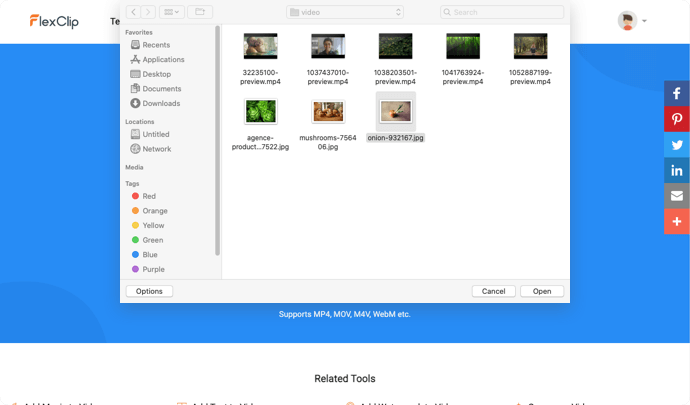

1. Upload YouTube Video
Start by uploading your YouTube video to FlexClip's YouTube video compressor.
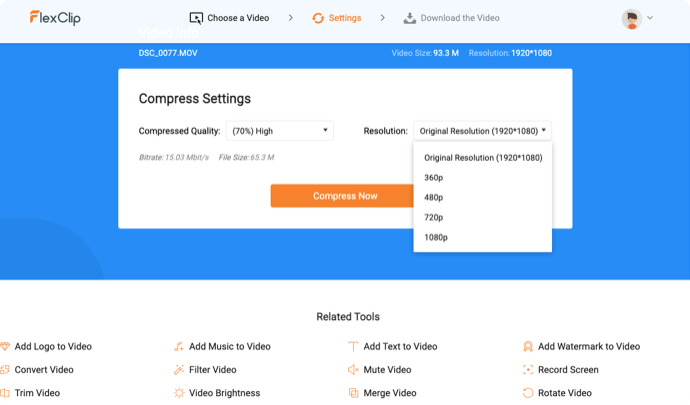
2. Set the Specs
Choose the quality level and video resolution and then start compressing.
3. Download the Video
Download the compressed video quickly or keep polishing it in the editor.
Cutting Tips
The length of the video you uploaded exceeds the limit. To ensure the user experience, it will be trimmed from the beginning of the video to 30 minutes. You can upload more videos in the editor.
Cancel
Got it